Feature  ·  Tracing

See exactly what your agents are doing.

Every LLM call, agent step, and tool invocation captured as a structured trace — with cost, latency, and tokens per span.

Works with OpenAI, Anthropic, LangChain, CrewAI, AutoGen, LlamaIndex, and OpenTelemetry.

Start free →View docs
Zespan Tracing
Works withOpenAIAnthropicLangChainCrewAIAutoGenLlamaIndexGoogle ADKOpenTelemetry

< 5 min

setup

OTel native

OTLP/HTTP

100 events

per batch

1.0  Tracing

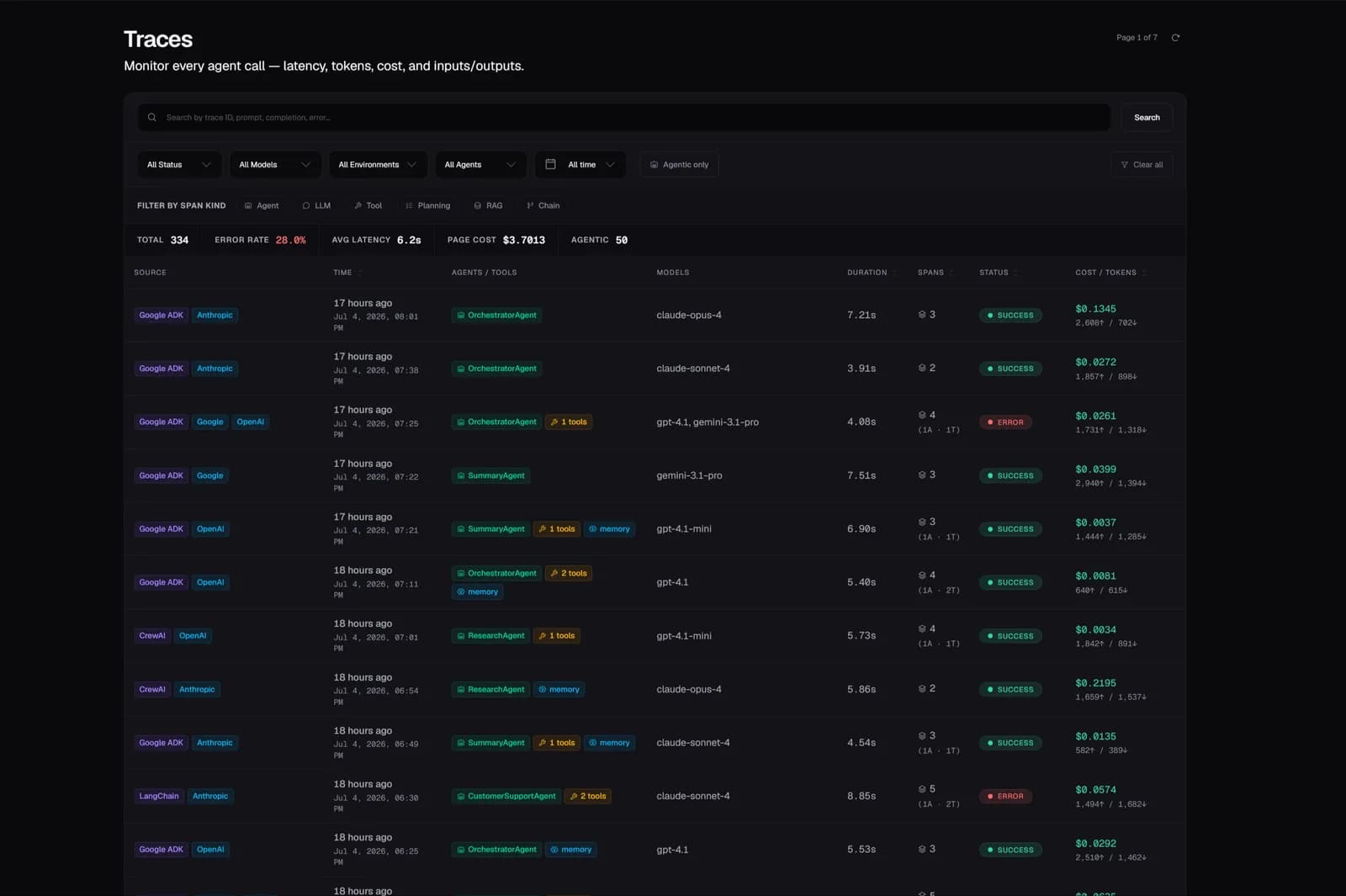
Trace Explorer

What you get

Filter by status, model, agent, operation, user, environment, or time rangeSpan attributes: model, provider, agent_name, tools_used, user_id, session_id, prompt_hashError drill-down: filter by status=error, inspect error_code and message per span

A filterable, sortable list of every trace — latency, cost, status, model, agent, and operation in one view. Click any trace to open the span waterfall: the full parent/child hierarchy with exact timing, tokens, and cost per span.

Zespan trace explorer showing span waterfall with per-span cost and latency

2.0  Tracing

Session Grouping

What you get

Session list: cost, tokens, error count, models used, first message previewSession detail: all traces chronological with per-trace breakdownuser_id threading: per-user cost and usage across sessions

Traces sharing a session_id are grouped into conversation sessions automatically. See total cost, token counts, error rate, and a first-message preview per conversation — no extra instrumentation.
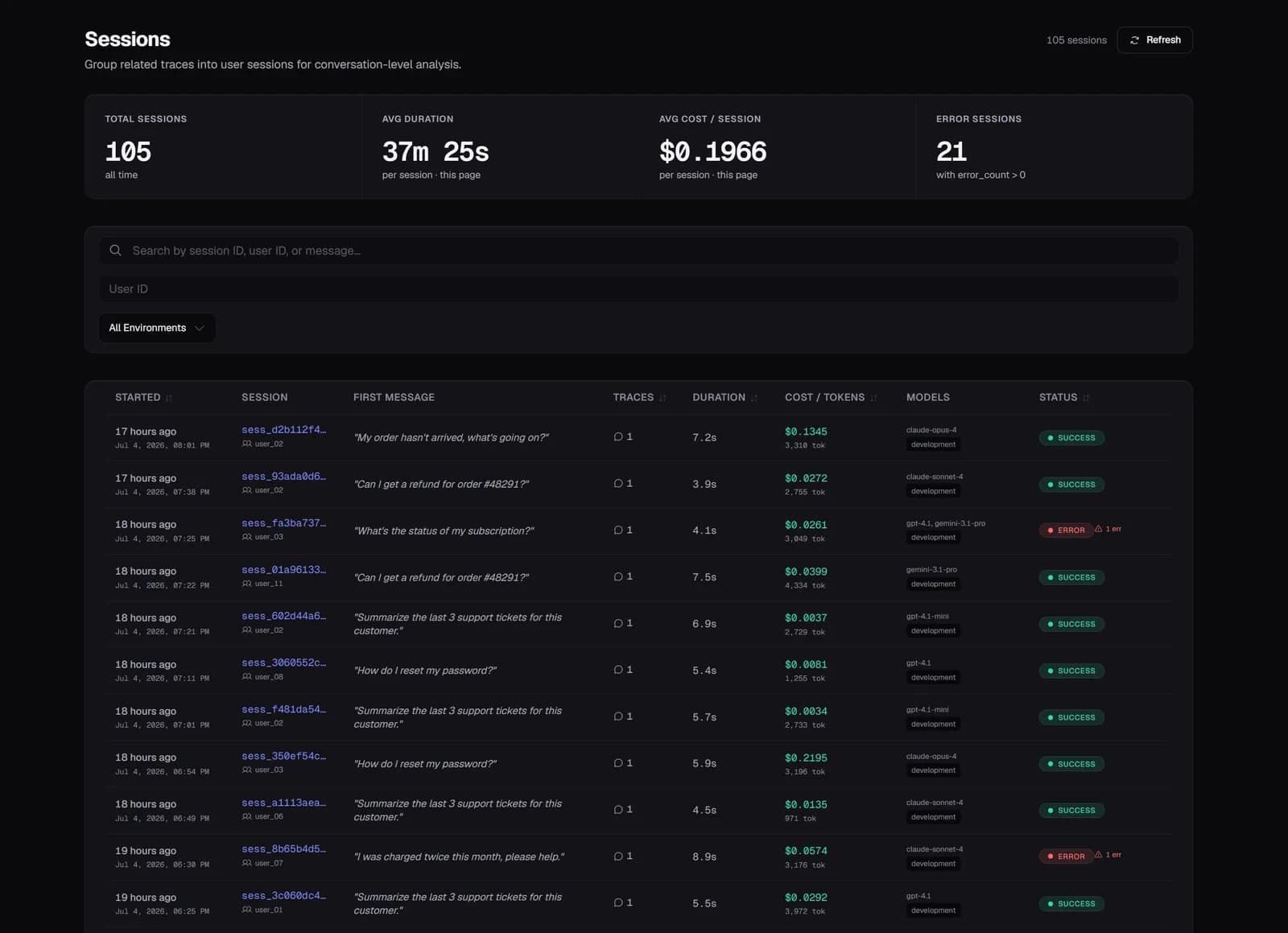
Zespan session list showing multi-turn conversations with cost and error counts

3.0  Tracing

OpenTelemetry Ingest

What you get

Standard OTLP/HTTP — no proprietary format requiredWorks with OTel Collector, LangChain, CrewAI OTel export, and custom exportersBaggageSpanProcessor propagates custom baggage through distributed spans

Native OTLP/HTTP endpoint at /v1/otel accepts standard OTel spans, resource attributes, and instrumentation scopes. Plug in any OTel-compatible framework without changing how you instrument.

4.0  Tracing

AI Root Cause Analysis

What you get

One-click from trace detail — no configuration requiredWorks across multi-agent traces: attributes failures to the correct agentReturns structured explanation, not raw log output

Click 'Analyze' on any failed trace and Zespan runs AI-powered root cause analysis over the full span tree — returning a structured explanation of what failed, which span is the root cause, and why.

Setup

Under 5 minutes,
two lines of code.

No forking and no architecture changes. Traces appear within seconds of the first agent run, with cost attribution, eval scores, and anomaly alerts on by default.

typescript
import { Zespan, wrapOpenAI } from '@zespan/sdk';

const lt = new Zespan({ apiKey: process.env.ZESPAN_API_KEY });
const openai = wrapOpenAI(new OpenAI(), lt);

// All completions now traced — tokens, cost, latency, errors
const res = await openai.chat.completions.create({ model: 'gpt-4o', messages });

Common questions

Does adding the SDK affect my app's latency?

No. Traces are sent asynchronously — events are queued in the background and written to ClickHouse by a worker process. The SDK adds zero latency to your LLM calls.

Do I need OpenTelemetry to use Zespan?

No. The SDK's wrapOpenAI(), wrapAnthropic(), and similar wrappers handle instrumentation automatically. OpenTelemetry is an alternative path if you're already using OTel or want to use the OTLP/HTTP endpoint directly.

What frameworks does tracing support?

OpenAI, Anthropic, Google GenAI, Bedrock, Groq, Mistral, OpenRouter (provider wrappers), plus LangChain, CrewAI, AutoGen, Google ADK, LlamaIndex, Vercel AI SDK, and PydanticAI (framework handlers). OpenTelemetry covers any other framework.

How long is trace data retained?

Retention depends on plan: 14 days (Free), 30 days (Solo), 90 days (Pro), 180 days (Team). Enterprise retention is configurable.

Is my LLM call data used to train models?

No. Your trace data is never used for model training by Zespan or shared with any third party.

Explore more features

All features →
Agent MonitoringKnow which agents are healthy, and which aren't.Composite health scores, delegation graphs, and per-agent cost attribution — built for systems with many cooperating AI agents.EvaluationsMeasure output quality on every trace, automatically.12 built-in LLM-as-judge templates run on every new trace with no setup. Track quality trends, catch regressions, and run manual eval campaigns.GuardrailsStop bad outputs before they reach users.7 guardrail types run inline on every LLM request — block, warn, redact, or log. PII, toxicity, topic drift, format, cost ceiling, and custom rules.Prompt ManagementShip prompt changes without breaking production.Version history, production promotion, automatic regression detection after every deploy, and AI-powered optimization suggestions.

Your agents are running.
Do you know what they’re doing?

Observe, evaluate, guard, and control every agent, live in minutes. No credit card required.

Free tier availableUnder 5 min setupNo credit card